/ EUR
/ EUR
3D rendering can very quickly show whether infrastructure was built "to spec" or for real studio work. If several people simultaneously launch scenes in Blender, Unreal Engine or Redshift, it suddenly becomes clear that a regular workstation isn't enough. And this is exactly when the topic of owning a GPU server comes up – not as "AI equipment", but as full-fledged production infrastructure for VFX, animation and rendering 24/7.
Does a VFX studio still need its own GPU server when render clouds exist?
Yes – and for many studios, a local GPU server is still simply more cost-effective and convenient for daily work. Cloud rendering works great for short projects or temporary rendering peaks, but when a studio constantly works on:
- large assets,
- 4K and 8K scenes,
- animations,
- video compositing,
- Unreal Engine,
- Blender,
- Cinema 4D,
data transfer costs and continuous GPU rental quickly add up. And here many people overlook one thing – a render farm in a studio works completely differently than cloud GPU. Local infrastructure:
- doesn't charge per rendering hour,
- gives full control over projects,
- allows rendering non-stop,
- doesn't require continuous asset uploads.
With larger VFX projects, data transfer can be truly enormous. Just:
- simulation cache,
- textures,
- EXR files,
- 3D assets,
- Unreal Engine projects,
often occupy hundreds of gigabytes or several TB. And that's exactly why many studios, after initial cloud rendering enthusiasm, return to their own GPU infrastructure. This doesn't mean cloud doesn't make sense. For small teams or seasonal projects, cloud can be great backup. But if a studio renders daily and maintains multiple artists simultaneously, owning a GPU server quickly becomes simply more cost-predictable.
Why has GPU rendering replaced classic CPU rendering in Blender, Unreal Engine and Redshift?
GPU literally powers modern 3D rendering today. Most contemporary rendering engines are heavily optimized for CUDA and NVIDIA acceleration. This applies especially to:
- Redshift,
- Octane,
- V-Ray GPU,
- Unreal Engine,
- parts of Blender Cycles workflow.
And that's exactly why modern VFX studios need much more:
- efficient GPU,
- large VRAM,
- fast storage,
- powerful data throughput,
than just "powerful CPU". The difference is enormous. According to research data, GPU servers can render:
- even 100-1000× faster than classic CPU environments for certain rendering workloads.
That's why configurations based on:
- 2-4 GPU RTX 4000/5000/6000,
- or more powerful NVIDIA enterprise platforms
have become the standard in:
- animation,
- VFX,
- game dev,
- virtual production,
- 24/7 rendering pipelines.
CPU still matters, of course. Especially for:
- simulations,
- compositing,
- preprocessing,
- physics pipeline,
- some older renderers.
But today's rendering is primarily dependent on:
- number of GPUs,
- VRAM,
- storage throughput,
- and speed of data cache.
And that's exactly why a well-configured VFX server today much more resembles an HPC node than a classic "corporate server".
What does a sensible GPU server configuration look like for a VFX and 3D animation studio?
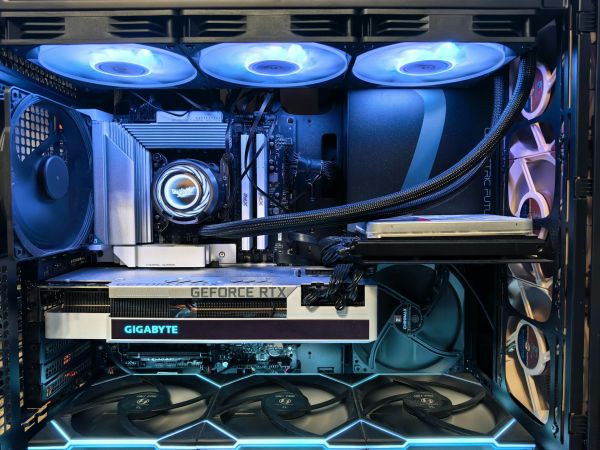
A well-built GPU server for VFX must be prepared to work under very high load for many hours or even entire days. Here it's not just about benchmarks, but about rendering stability, temperatures, data transfer and maintaining high GPU utilization.
That's why sensible VFX studio configurations very often start today with:
- 2× Xeon or AMD EPYC,
- 128-512 GB ECC RAM,
- 2-4 GPU RTX 4000/5000/6000,
- fast NVMe RAID 10 cache,
- additional SATA storage for assets and backup,
- 25/100 GbE networking,
- redundant 2000-2400 W class PSUs.
In more elaborate environments, configurations like:
- 4× RTX 4000 20 GB,
- 512 GB ECC,
- 2× 2 TB NVMe RAID 10,
- additional SATA SSD for asset library and render caches
work very well. And this is where you start seeing the difference between a "powerful computer" and a true rendering server. Such infrastructure is designed for:
- 24/7 rendering,
- high temperatures,
- continuous data transfer,
- multiple artists working simultaneously,
- stability under very high load.
Airflow and power supply also matter enormously. With:
- 2-4 GPUs,
- large VRAM,
- non-stop rendering,
poorly designed cooling quickly ends up with throttling or workload instability. That's why professional GPU servers for VFX have:
- redundant PSUs,
- hot-swap capability,
- elaborate cooling,
- and chassis prepared for very high airflow.
When is 2× GPU enough, and when should studios go 4× GPU and own render farm?
Two GPUs very often comfortably suffice for a small or medium VFX studio. Especially when:
- a few people work on projects,
- rendering doesn't run non-stop,
- workload is more project-based than continuous,
- some renders still go to cloud GPU.
And that's exactly why configurations like:
- 2× RTX 5000,
- 2× RTX 6000 Ada,
- or 2× RTX 4000,
work very well for:
- Blender,
- Unreal Engine,
- motion design,
- commercials,
- shorter animations,
- development work and preview renders.
The problem starts when:
- render queues get longer,
- multiple people simultaneously launch heavy scenes,
- studio works in 4K/8K,
- virtual production appears or rendering practically 24/7.
In such an environment, two GPUs simply become organizationally too small. It's not even purely about computing power. The bigger problem becomes:
- renders blocking between teams,
- no headroom for new projects,
- overloaded storage and cache,
- inability to render multiple pipelines in parallel.
And this is when it makes sense to have:
- 4× GPU,
- separate render node,
- or small render farm based on several rack servers.
Such a model gives much greater flexibility. One machine can render:
- final scenes,
- another viewports,
- third simulation cache,
- fourth AI denoising or compositing.
And that's exactly why more and more VFX studios today build environments more modularly instead of investing everything in one gigantic workstation.
Does a local GPU server still beat the cloud for 3D rendering?
With regular rendering, a local GPU server very often turns out simply cheaper over time. Especially when a studio works daily on:
- large projects,
- multiple renders,
- heavy assets,
- Unreal Engine and Blender pipelines.
Cloud rendering works great for:
- short projects,
- temporary peaks,
- extra power "on demand",
- seasonal work.
But if rendering runs practically daily, costs start growing very fast. And it's not just GPU rental. Add:
- data transfers,
- asset uploads,
- project synchronization,
- cloud storage,
- pipeline latencies.
With larger VFX projects, data transfer can be enormous. Just:
- simulation cache,
- asset libraries,
- EXR files,
- render sequences,
- 8K textures,
quickly start counting in TB. And that's exactly why many studios choose a hybrid model today:
- local GPU server for daily work,
- cloud as backup for larger rendering peaks.
This usually gives the best balance of:
- costs,
- performance,
- scalability,
- data security,
- and control over production pipeline.
Because a well-configured local GPU server can still be a much more predictable environment than continuous cloud rendering scaling.
A modern VFX studio today needs infrastructure that can handle not just a single render, but an entire production pipeline running in parallel for multiple people. That's why a well-built GPU server increasingly resembles a specialized HPC node – with fast NVMe, large VRAM, powerful networking and stable cooling for 24/7 rendering. And these are the environments starting to truly shorten production time, instead of just looking good on paper.
FAQ
Does a VFX studio still need its own GPU server?
Yes – especially with regular rendering and large 3D projects.
How many GPUs should a rendering server have?
Usually 2-4 enterprise RTX class GPUs.
Is GPU more important than CPU in rendering today?
In most modern renderers – yes.
How much RAM does a VFX server need?
Usually 128-512 GB ECC RAM.
Why is NVMe so important for 3D rendering?
Because cache, assets and rendering data generate enormous data transfer.
Is cloud rendering always cheaper?
No – with daily rendering, a local server often works out better.
Most common problem with poorly selected VFX server?
Too weak storage or insufficient VRAM relative to workload.