/ EUR
/ EUR
The two most popular server systems on the market. Both proven. Both stable. Both have their supporters. But when it comes to choosing a specific model – it's no longer about the logo on the chassis. What matters is how the equipment performs in practice, how much it costs to maintain, how long it lasts without failure and whether you can expand it without headaches. In this text we compare Dell PowerEdge and HP ProLiant. We examine: deployment, service, reliability, long-term cost-effectiveness and concrete application scenarios.
HPE ProLiant vs Dell PowerEdge – which server deploys faster, maintains easier and expands cheaper?
To start – Dell PowerEdge will usually be faster to deploy and simpler in later operation. Ready configurations, less restrictive firmware approach and more "friendly" spare parts policy mean that in many environments Dell simply works faster and cheaper.
What makes a difference in deployment and maintenance?
- Dell allows 3rd party component installation without warning messages – e.g. RAM, drives, network cards.
- HP ProLiant is more closed, especially in newer models – installing other components can end in POST errors.
- iDRAC interface (Dell) is readable and accessible immediately, HP iLO – requires license activation for many functions.
- Expansion time: Dell R740 can be expanded in 15-20 minutes, HP DL380 Gen10 – even 2-3 times longer, especially without original components.
Of course, much depends on the model and specific configuration, but in most cases Dell tends to be more "transparent" for admins. It works without workarounds and doesn't require finding solutions. HP – solid, but sometimes too "corporate" for smaller or dynamic environments.
What's better – Dell PowerEdge or HP ProLiant in 24/7 and mission-critical environments?
Here it's not price or convenience that matters, but resilience, stability and mean time between failures. And while both systems score great in reliability tests, in mission-critical environments HP ProLiant is more often chosen.
Why?
- HP has been developing enterprise-class solutions for years – redundancy, hot-swap, self-healing BIOS, dual power supplies are standard even in medium configurations.
- DL360 and DL380 Gen10 servers are exceptionally resilient to errors, even with non-stop operation and elevated temperatures.
- HP iLO system (with active license) provides full remote control – ideal for environments where physical access is difficult.
- ProLiant is widely used in banking, healthcare, industrial production – anywhere failure isn't just a cost but a threat.
Dell isn't far behind – PowerEdge R740 or R650 are machines with very high SLA and low failure rates. However, in very demanding scenarios HP has a reputation as an "armored platform" you don't need to touch for years. This can make a difference where downtime is not an option.
Dell PowerEdge vs HPE ProLiant comparison – when is initial price not everything?
Dell will usually be cheaper at the start – HP can work out better long-term. The differences aren't obvious at first glance, but when you add up service costs, licenses, upgrades and power consumption – HPE often comes out cheaper in a 3-5 year view.
Where does total cost of ownership (TCO) hide?
- Dell has lower purchase cost – both new and post-lease units.
- HP consumes less power in idle and partial load states – according to SPECpower tests.
- Dell spare parts are cheaper, but HP breaks down less often (lower operational costs).
- Dell iDRAC licenses can be free, but limited – HP iLO in Advanced version often includes more features as standard.
For companies looking for a server "for now" – Dell is an excellent choice. But if equipment is to work for several years without touching it, with expansion on the horizon and SLA requirements – it's worth calculating TCO. Because catalog price is just the beginning of the story.
PowerEdge versus ProLiant in practice – which models work best in small, medium and large companies?
Server selection should depend not on brand, but on needs and business scale. Both PowerEdge and ProLiant offer very wide product lines – from entry-level models to enterprise-class solutions. However, it's worth knowing which models offer the best price-to-performance ratio for your company size.
For small and micro companies:
- Dell PowerEdge T150 (Tower server): cheap, simple, ideal for backup, AD, small CRM.
- HP ProLiant ML30 Gen10: similar scope, slightly more closed platform, but proven.
For medium companies:
- Dell R640 or R740: rack servers, flexible, for VMs, ERP, SQL, warehouse systems.
- HP DL360/DL380 Gen10: very efficient, stable, with better energy optimization.
For large companies and critical environments:
- Dell R750, R760, MX740c (Blade) – for clusters, virtualization, AI, containers.
- HP Synergy, Apollo, DL580 Gen10+ – specialized task solutions, SAP, HANA, CI/CD.
It's worth remembering that Dell more often appears in hybrid or cloud-ready environments, while HP dominates projects with greater conservatism and long equipment lifecycle.
HPE ProLiant or Dell PowerEdge – who wins on performance in AI, VM and big data?
In tasks like artificial intelligence, data analysis or virtualization – more matters than just processor speed. Also important are: number of cores, support for large amounts of RAM, PCIe slot throughput and expandability with accelerators (e.g. GPU – graphics cards for computational tasks).
Key factors affecting performance in AI/VM/big data:
- Dell PowerEdge has better GPU support – e.g. R750 models can accommodate 4-6 NVIDIA A100 cards,
- HP ProLiant performs better in multithreading and RAM management – especially in DL580 Gen10+ models,
- PCIe Gen4 slots (new generation connectors for expansion cards) available in newer Dells sooner than HP,
- In single-threaded tests (e.g. legacy applications), Dell often achieves better results, in multi-threaded – HP catches up with 4th generation Xeon Scalable power.
There's no clear winner here. Dell dominates where GPUs and flexibility are needed, HP – where continuous load and full CPU + RAM utilization matter.
Dell iDRAC vs HP iLO – which server management system gives more, faster and without workarounds?
Both solutions enable remote server management – restart, monitoring, updates, console access. For many admins it's a daily tool. In practice, however, Dell iDRAC is easier to use and doesn't require paid licenses immediately.
What's worth knowing?
- iDRAC (Dell) works immediately after connection – no activation, no registration.
- iLO (HP) requires active license to e.g. obtain remote console access or upload ISO image.
- Dell interface is more "user-friendly", runs smoothly in HTML5.
- HP offers better API documentation and automation (for large environments – a plus).
In smaller environments – Dell wins on simplicity. In larger ones – HP offers more possibilities, but you have to pay for them. For many companies, the mere fact that iLO can refuse to act without a license is sufficient argument to go with PowerEdge.
Which server consumes less power, and which will be easier to cool? ProLiant vs PowerEdge by the numbers
HP ProLiant usually consumes less energy – especially in idle mode and with partial load. Dell on the other hand handles full load work better and offers more cooling configuration options.
Data from tests and practice:
- in SPECpower tests (industry energy consumption benchmark), HP DL360 Gen10+ performed 10-15% better than Dell R640,
- Dell better manages ventilation at 70-100% load – fans are louder but more effective,
- HP power supplies have higher efficiency (called Platinum+) and respond better to variable loads,
- HP usually generates less heat – which reduces air conditioning costs, especially in small server rooms.
In summary – HP can be more cost-effective for companies that count every watt and don't have ideal cooling conditions. Dell – when equipment should "go all out" and there's no room for performance compromises.
Summary – PowerEdge or ProLiant? Depends on what you need (and how you work)
There's no one right answer. Dell and HP are two different philosophies, two ways of managing and two approaches to expanding IT infrastructure. Dell will appeal to those who value deployment simplicity, flexibility, less restrictive component approach and fast operation without unnecessary licenses. HP – for those building infrastructure for years, needing maximum reliability, excellent energy efficiency and automated management.
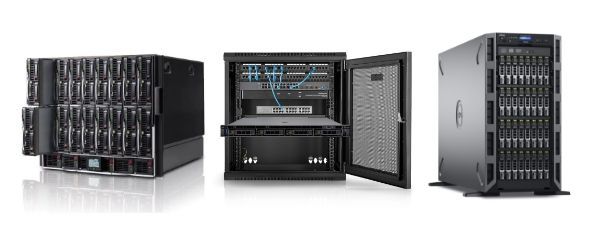
In Hardware Direct's offering you'll find both lines – ready to work, tested, with warranty and technical support. See Dell PowerEdge Rack, Blade and Tower server configurations – from small T150 to powerful R760 for AI and virtualization today. Or maybe you're betting on HPE ProLiant? You'll find proven DL360, DL380, ML350 and Blade units for 24/7 environments here too.
FAQ
Are Dell servers more "compatible" with components than HP?
Yes – Dell has a more flexible approach to third-party components. Many PowerEdge models allow using RAM, SSD or network card substitutes without POST errors. In HP ProLiant (especially Gen10+) certified components are often required, otherwise BIOS may block or limit their operation.
Which server is better for virtualization – Dell or HP?
It depends on scale. For small and medium virtual environments Dell PowerEdge (e.g. R640, R740) offers excellent performance-to-price ratio. With large VM farms, HA clusters or HCI – HP DL380 Gen10+ with fast RAM and powerful Xeon Scalable processors can deliver better results at 24/7 loads.
Is Dell iDRAC free?
Yes – the basic iDRAC version is available immediately and allows monitoring, restart and some remote functions. iDRAC Enterprise version provides full remote console access, ISO, virtual media – but you can operate without it. In HP iLO – most of these functions require a paid license.
Which server has lower power consumption?
HP ProLiant usually performs better in energy efficiency tests, especially in idle state and with partial load. Dell generates more heat, but performs better at full load. If the server is to run continuously – it's worth comparing specific models based on SPECpower tests.
Can you mix Dell and HP servers in one infrastructure?
Yes – there are no technical obstacles preventing both systems from working together. You just need to remember that each has a different management system (iDRAC vs iLO), different firmware, different update approach. It's also advisable to avoid mixing environments within one cluster group – easier to maintain consistency.
Which server will be better for AI and GPU computation?
Dell PowerEdge has better GPU expansion support – e.g. R750, R760, C4140. It allows mounting multiple graphics cards (e.g. NVIDIA A100, L40S), has more powerful power supplies and better optimized cooling. HP also supports GPU, but mainly in high-end models (Apollo, DL385) and often requires additional adapters.